
Call Recorder: ver 0.99 – more stable, more flexible!
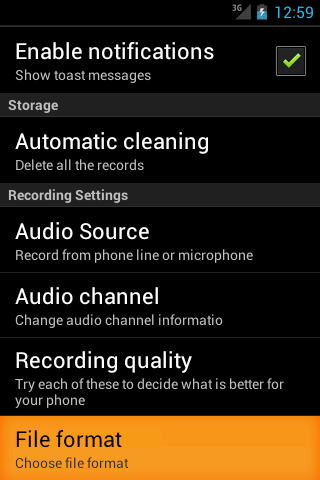 In this version were fixed a lot of issues related to the phone recording. Furthermore were added few additional options:
- Audio Source. Phone line (by default) or microphone. For those phones were recording does not work it can be option to use Microphone and then turn on the speaker during the call.
- Audio channel. Some phones does not support stereo recording. So this also might help.
- Recording quality. The better quality chosen the biggest size of recorder file and more memory resources are using by the app. So if your phone rebooting itself during the call – please try with lees quality. (This option actually does not work for some phones and by default. And does not have any impact).
- File format. 3GPP (by default) or MP4.
If your phone works fine by default after installing this version you should not care about new settings 🙂
Leave a Reply